
FeatherPad was designed around a simple constraint: the notebook should work without depending on an application backend. Not “mostly client-side” and not merely “offline-friendly.” The browser is responsible for persistence, package loading, compilation, execution, and enough local state to make the notebook useful on its own.
The product combines rich writing with executable code in the same workspace. User content is stored locally, JavaScript is bundled in-browser with esbuild-wasm, dependencies are resolved from public package registries, and executed output is isolated inside a sandboxed iframe. The browser is not just the interface; it also becomes part of the runtime and the system of record.
That decision moved several familiar engineering problems into the client. Persistence, execution, dependency resolution, isolation, recovery, reproducibility, and application state all had to work together without making the notebook feel heavy or fragile. FeatherPad became an exploration of how much responsibility a browser can reasonably carry before the frontend starts behaving like a small application platform of its own.
What FeatherPad is
FeatherPad is a browser-based notebook organized around a simple hierarchy: workspaces contain notebooks, notebooks contain notes, and notes contain cells or blocks.
A note is not treated as one large text document. It is a vertical composition surface where markdown, rich text, code, callouts, images, tables, task lists, and embeds can live together. In that sense, the product sits somewhere between a writing tool and a lightweight computational notebook: it is intended for personal knowledge work, but it also gives an idea somewhere to become executable without leaving the document.
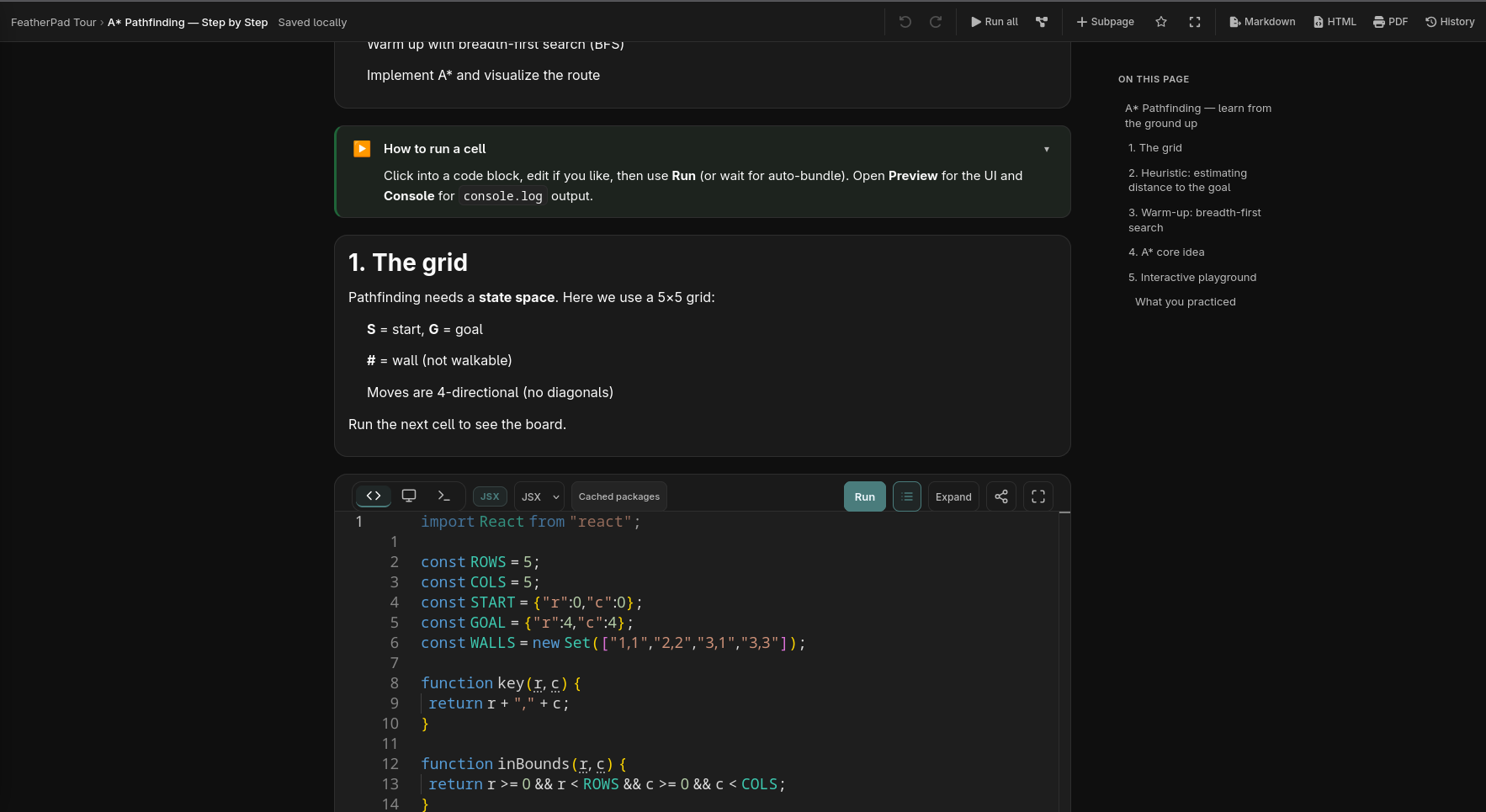
The screenshot above captures the product more clearly than a feature list can. Explanation and execution occupy the same document. A structured note can introduce a concept, walk through it step by step, and then place an executable code cell directly underneath the prose. The surrounding interface keeps notebook navigation, document structure, execution controls, and the current page visible without turning the notebook into an IDE.
That combination is the core product idea. Most note-taking tools and most coding environments are separated by an invisible boundary. One is optimized for explanation and structure; the other is optimized for execution. Moving between them introduces friction: a thought has to be recreated as code somewhere else, while an experiment often loses the context explaining why it mattered.
FeatherPad treats those as parts of the same workflow. The goal is not simply to put a code editor inside a notes app, but to let explanation and experimentation remain next to one another as the work evolves.
The stack reflects that split in responsibilities. React and TypeScript form the application shell, Vite handles the frontend build, TipTap provides the rich writing experience, Monaco handles code editing, and Redux provides the application's central state model. The more unusual part begins after the user presses Run: esbuild-wasm bundles code directly in the browser, fetched dependencies are cached locally, and the compiled result executes in an isolated preview.
Why the browser-only constraint shaped the architecture
A conventional notebook could push much of this work to a backend. The server could store documents, install dependencies, compile code, manage execution environments, and return results. FeatherPad deliberately does not have that layer.
That simplifies some things. There is no application server to provision or operate, and user content remains close to the browser session that created it. But those benefits come with a corresponding responsibility: the client has to provide enough persistence and runtime structure that the application still feels coherent after refreshes, navigation, code execution, and dependency fetching.
That is why the local-first architecture is not merely a product feature. It determines where the boundaries of the system sit.
At a high level, FeatherPad is a client-only single-page application with Redux as its canonical state layer. The important persisted slices are notebooks, notes, and cells. Temporary creation state and bundle output remain transient. Redux Persist serializes core content into localStorage, while localForage is used separately as an IndexedDB-backed cache for fetched package modules.
On startup, the application creates the store, restores persisted state, mounts the React shell, and lazily loads the matched route. The route structure itself stays straightforward—a landing experience, a playground, and the notebook workspace—because most of the interesting complexity lives deeper in the execution and persistence paths.
The notebook model keeps writing and execution in the same document
The editing model is block-based rather than treating a note as one monolithic field. Notes render through a structured document layout with a fixed control gutter and a flexible content column. That allows rich writing and executable cells to share one page without forcing them through the same editor.
The larger workspace makes that document model easier to see:
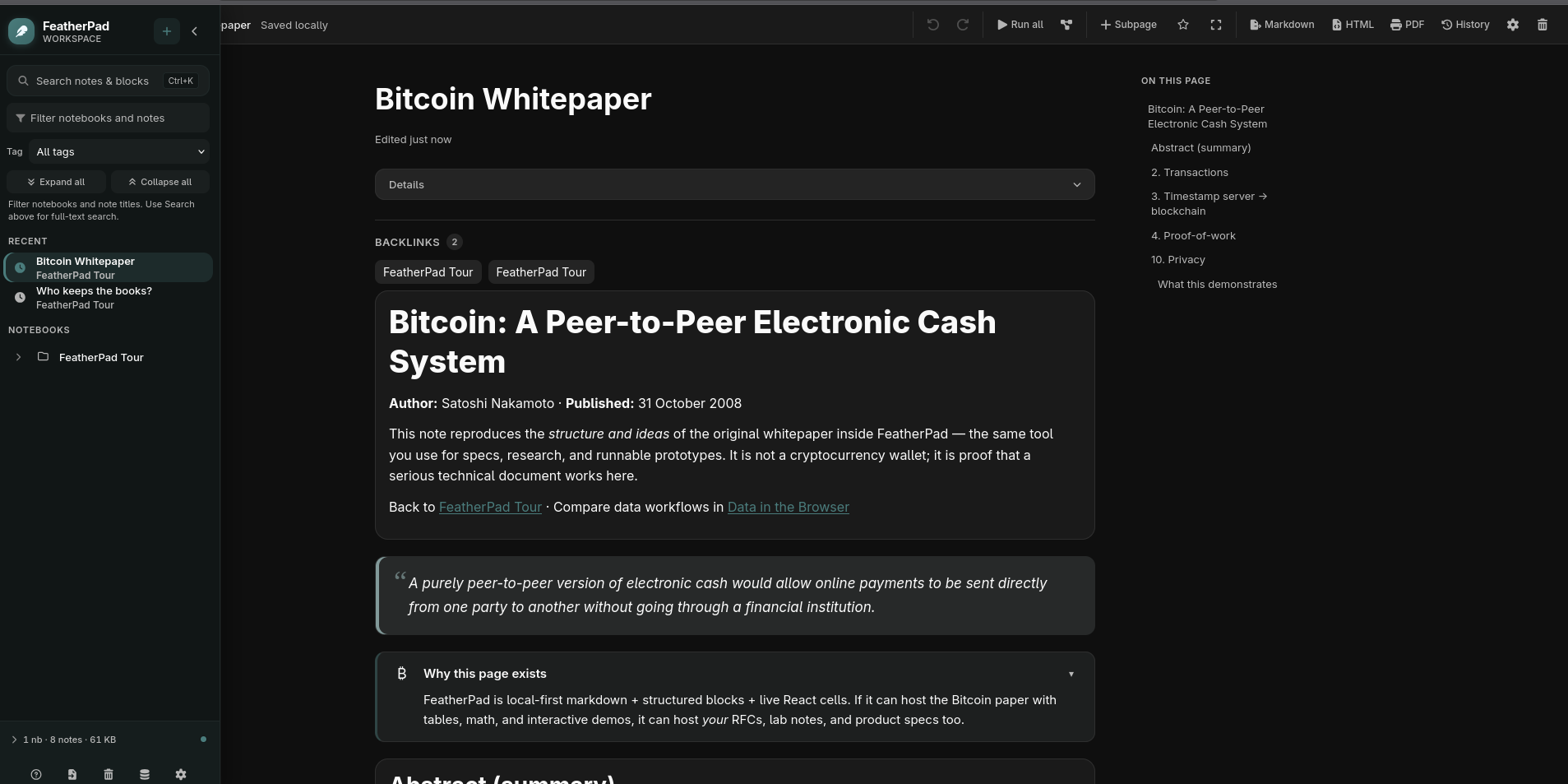
The interface combines notebook navigation with document-level structure. The visible note includes backlinks, a table of contents, rich text, and callout-style blocks while remaining part of the same locally stored workspace. That matters because FeatherPad is not only trying to join prose with executable code; it is also trying to make longer technical notes navigable enough to serve as durable working documents.
TipTap and Monaco remain separate for a similar reason. TipTap is better suited to structured rich content, while Monaco provides the behavior expected from a real code editor. Using both increases bundle weight and integration work, but forcing one editor to impersonate the other would weaken both experiences.
The underlying data model stays deliberately simpler. Cell content is stored through a uniform Cell.content string, including richer block types that serialize structured JSON into that field. It is not the most theoretically pure representation, but it keeps reducers and persistence predictable in an application where the client already has significant runtime responsibility.
That tradeoff is representative of FeatherPad as a whole: use complexity where it protects the product idea, but avoid introducing it simply to make the architecture look more sophisticated.
The execution pipeline lives entirely in the browser
The most important runtime path is the one that turns a code cell into executable output.
When a user edits a code cell, Redux receives the update. Middleware constructs the cumulative notebook program, missing dependencies are resolved and pinned when necessary, esbuild-wasm bundles the result inside the browser, fetched modules are cached, and the compiled output is sent into a sandboxed iframe for execution and display.
Conceptually, the flow looks like this:
In many products, that pipeline would cross a backend boundary. In FeatherPad, it never leaves the frontend runtime.
The bundler runs with esbuild-wasm, package loading is handled through custom plugins, and the result executes in a sandboxed iframe with console interception and runtime error reporting. That makes the notebook computational rather than decorative: code cells produce actual browser-side output instead of displaying a simulated preview.
The iframe boundary matters because executing notebook output directly inside the application shell would mix user code with the application's own runtime. Isolation does not eliminate every concern around executing code in a browser, but it gives the preview a deliberately separate environment and keeps the main React application from serving as the execution surface.
Code cells are sequential rather than isolated snippets
FeatherPad also gives code cells notebook semantics instead of treating each editor as an independent playground.
Earlier code cells become available to later ones, so a notebook can build context as the user moves down the page. The current cell also receives a print() implementation capable of rendering primitives, objects, or React elements into the preview.
That means a document can evolve naturally:
explanation
↓
small code experiment
↓
more explanation
↓
code that builds on the earlier experiment
↓
rendered result
The behavior is intentionally sequential. In a thinking tool, code often depends on the reasoning that came before it, and later experiments frequently build on earlier ones. Treating every cell as an isolated snippet would make the notebook visually integrated while remaining computationally fragmented.
The visible pathfinding notebook reinforces that design. The page begins with explanation, moves through numbered concepts, and places executable JSX directly in the learning flow rather than redirecting the user to a separate playground.
Dependency resolution needs memory too
Running browser-side code becomes more complicated once a cell imports a package.
FeatherPad resolves external dependencies through public package sources and caches the resulting modules locally with localForage and IndexedDB. This separates package data from the core Redux-persisted notebook state: documents remain application state, while fetched modules behave more like a local network cache.
Per-note dependency pinning adds another layer. A note can maintain a depsLock map so imports resolve to specific versions rather than silently drifting as upstream package versions change.
That is a relatively small feature in the interface, but it addresses a larger notebook problem: code that ran when it was written should not casually become a different program later because a dependency resolver chose a newer release.
Reproducibility is often treated as an infrastructure concern in larger systems. In FeatherPad, some of that responsibility belongs directly to the document model because the document itself contains executable work.
Persistence is part of the product experience
A browser-only notebook only works if refreshes and revisits do not make the application feel disposable.
The product makes that promise visible even on its landing page:
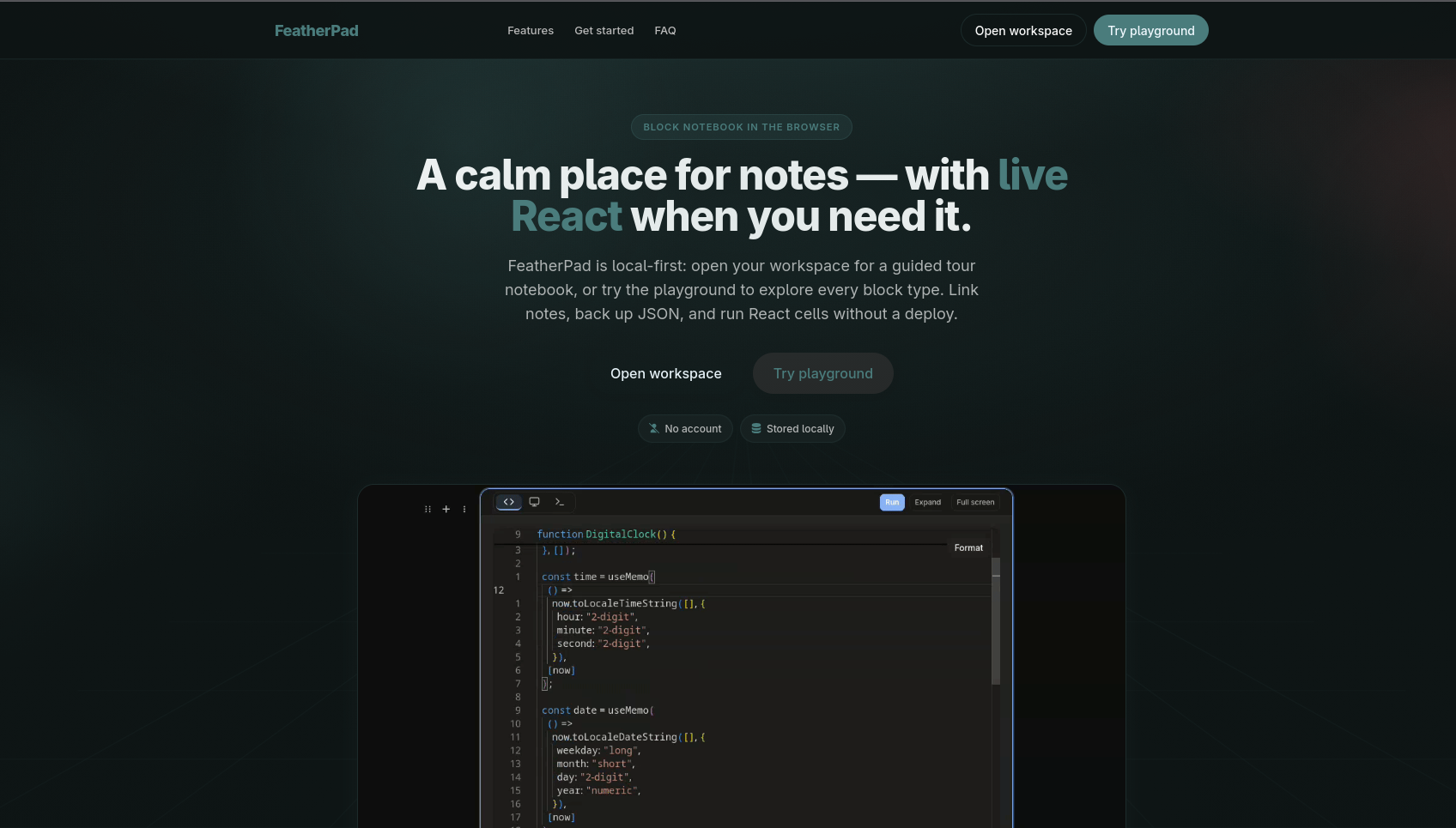
The page emphasizes that there is no account requirement and that the workspace is stored locally. Those are not merely marketing details; they describe the architectural constraint the rest of the application has to uphold.
Redux Persist handles the primary notebook state through localStorage, allowing workspaces, notebooks, notes, and cells to survive reloads. Module data uses a separate IndexedDB-backed path because the characteristics of cached packages are different from authored notebook content.
This separation matters. Persisted user content is authoritative from FeatherPad's perspective. A downloaded package module is replaceable cache data. Putting both into the same storage model would make different classes of data look equivalent even though their recovery requirements are not.
The distinction can be summarized like this:
| Data | Role | Storage behavior |
|---|---|---|
| Workspaces, notebooks, notes, cells | User-authored content | Persisted application state |
| Bundle output | Derived runtime result | Transient |
| Fetched package modules | Reusable dependency data | IndexedDB-backed cache |
| Temporary creation state | Short-lived UI workflow | Transient |
The broader lesson is that "local state" is too vague to be a useful architecture by itself. The system still needs to distinguish what is authoritative, what is derived, and what can safely be reconstructed.
Key design decisions and tradeoffs
The first major decision was making FeatherPad client-only. It keeps deployment simple and makes the notebook feel self-contained, but it moves responsibilities normally handled elsewhere into the browser. Persistence and dependency loading are no longer implementation details; they become foundational parts of the application.
The second was using Redux plus custom middleware rather than leaving runtime behavior inside components. That gave cross-cutting operations such as ID generation, cumulative code construction, and bundler orchestration a central place to live. Redux would be unnecessary weight for a very small CRUD application, but FeatherPad's execution pipeline benefits from having a predictable state and middleware boundary.
The third was choosing specialized editors instead of one universal editing surface. TipTap handles rich documents while Monaco handles code. The tradeoff is extra bundle weight and integration work, but the benefit is that neither writing nor coding has to feel like the secondary mode.
The fourth was accepting a pragmatic cell representation. Using a common Cell.content string keeps reducers and persistence consistent even when richer cell types need to serialize structure into it. The model sacrifices some type purity in exchange for simpler orchestration.
None of those decisions is individually unusual. What makes FeatherPad interesting is how they reinforce the same product constraint: the browser has to do more work, so the internal boundaries need to stay understandable.
Where the browser-only model starts to strain
FeatherPad demonstrates that a browser can carry more application responsibility than a conventional thin frontend, but it also reveals where that approach becomes harder.
Package execution introduces questions about isolation and runtime errors. Dependency resolution introduces network availability and version reproducibility. Local persistence makes the browser the system of record, which means there is no remote application database described here to provide synchronization or recovery elsewhere. Specialized editing surfaces improve the experience but increase frontend weight and integration complexity.
Those are not arguments against the architecture. They are the cost of the product choice.
The important part is that the architecture acknowledges them. Module fetching has its own cache. User documents have their own persisted state. Execution has an isolation boundary. Dependencies can be pinned. Durable and transient data are not treated as interchangeable.
The browser-only constraint works because the rest of the design takes that constraint seriously.
What FeatherPad taught me
FeatherPad reinforced that frontend engineering can extend well beyond rendering views. Once the browser owns persistence, dependency resolution, compilation, execution, caching, and recovery behavior, architectural decisions that might normally belong to several system layers become client-side concerns.
It also taught me to be more deliberate about where complexity is useful. Running code in-browser is inherently more involved than displaying a text cell, so that complexity earns its place. Using Monaco and TipTap together creates integration work, but each protects an important part of the user experience. A uniform cell model is less elegant in theory, yet it keeps a heavily client-driven architecture easier to reason about.
The project also exposed the limits of elegant ideas. Local-first execution sounds simple as a product statement, but that promise eventually turns into questions about persistence, runtime orchestration, dependency versions, caching, failure handling, and isolation. Those are not distractions from the original idea. They are what implementing the idea honestly requires.
Takeaway
FeatherPad started from a small product question: what if writing and executable experimentation could happen in the same personal notebook without depending on an application backend?
Answering it required the browser to become more than a rendering layer. It stores the user's notebooks, caches dependencies, bundles JavaScript, executes output inside an isolated preview, restores state after reloads, and gives code cells enough shared context to behave like an actual notebook.
The screenshots make the result clearer. One workspace can hold a long-form technical document with backlinks and structured blocks; another can teach an algorithm with explanation and executable JSX in the same page. Neither requires the user to leave the notebook simply because the work crosses from writing into code.
That is what makes FeatherPad meaningful to me. The technical decisions are not there to make a notes application look complicated. They exist because the product asks the browser to protect a particular kind of flow: write an idea, turn part of it into code, run it, keep the result close to the explanation, and return later without losing the thread.
FeatherPad is ultimately a frontend system with a very specific point of view: keep the experience close to the user, keep the architecture honest about what the browser owns, and introduce complexity only where the product actually needs it.